
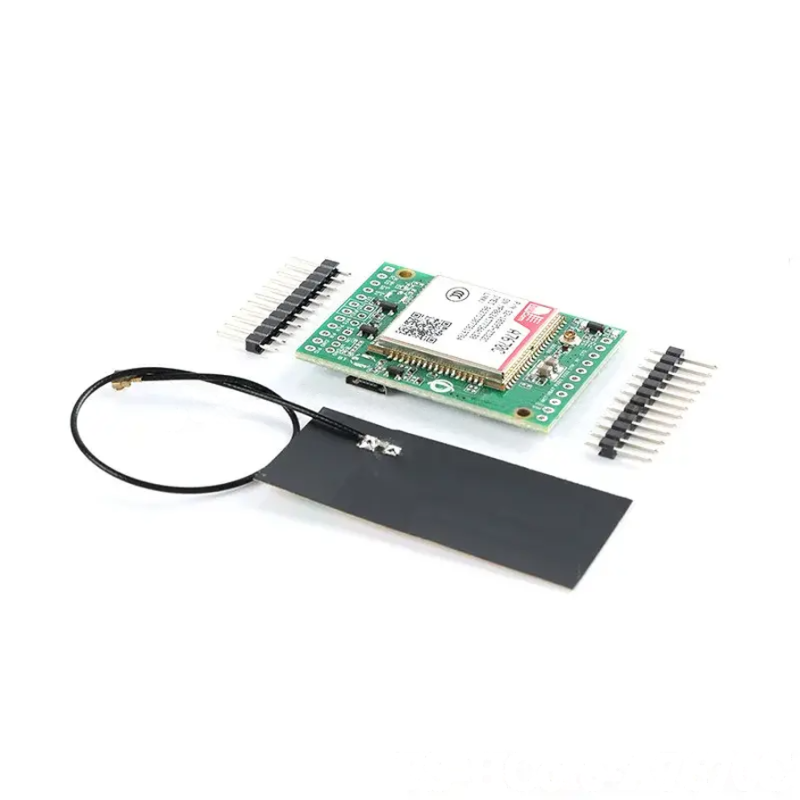
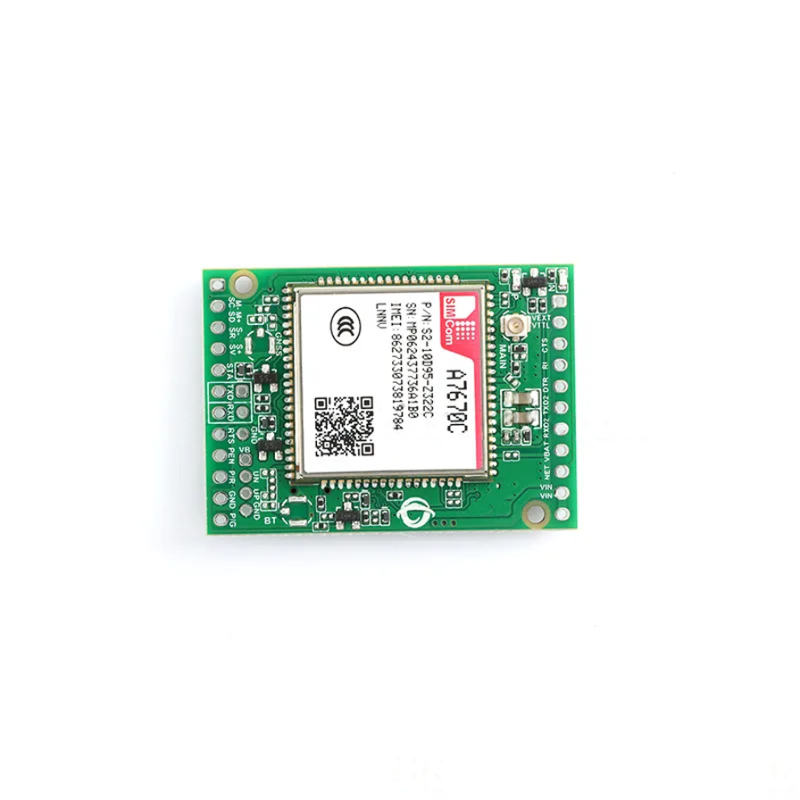
SIM A7670C 4G LTE Cat.1 Module – TTL Serial(FS-HCore-A7670C)
₹1,652.00 incl. GST (₹1,400.00 + GST)
The FS-HCore-A7670C is a development board featuring the SIMCom A7670C 4G LTE Cat.1 module, supporting 4G LTE and 2G GSM/GPRS connectivity. With UART AT-command communication, U.FL antenna connector, onboard SIM card slot, and status LEDs, it is ideal for IoT devices, remote data logging, GPS tracking, smart home systems, telemetry, Arduino, ESP32, STM32, and other embedded projects.
FS-HCore-A7670C 4G LTE Cat.1 Core Development Board – SIMCom A7670C
The FS-HCore-A7670C Core Development Board is a robust and versatile development platform built around the SIMCom A7670C 4G LTE Cat.1 cellular module. It provides an easy way to add cellular connectivity to embedded systems, IoT devices, remote monitoring equipment, GPS trackers, smart home systems, industrial automation projects, and other connected applications.
The board exposes the essential communication and power interfaces required to work with the A7670C module without directly handling the surface-mount cellular module. Its breakout design makes it convenient for developers to connect the board to a microcontroller or embedded host and communicate with the cellular modem using standard UART and AT commands.
The A7670C supports 4G LTE Cat.1 connectivity with a maximum theoretical data rate of approximately 10Mbps downlink and 5Mbps uplink, depending on network conditions, carrier support, configuration, and regional network availability. It also provides 2G GSM/GPRS fallback support, making it suitable for applications that need cellular connectivity across different network environments.
The development board includes an onboard U.FL (IPEX) antenna connector for connecting a suitable external cellular antenna. A dedicated SIM card holder is also provided, allowing a compatible activated SIM card to be installed for cellular network access.
With its UART interface, the FS-HCore-A7670C can be connected to platforms such as Arduino, ESP32, STM32, Raspberry Pi and other compatible microcontrollers or embedded computers. The host controller can communicate with the A7670C by sending AT commands through the UART interface.
Onboard status indicators provide useful visual feedback for power and network operation, helping users monitor the module during development and troubleshooting.
The FS-HCore-A7670C is therefore a convenient solution for developers who need a compact 4G LTE Cat.1 communication interface for IoT and embedded projects.
Features
- Integrated SIMCom A7670C 4G LTE Cat.1 module
- Supports 4G LTE cellular connectivity
- Supports LTE-TDD and LTE-FDD networks
- Supports 2G GSM/GPRS legacy connectivity
- Maximum theoretical downlink speed of approximately 10Mbps
- Maximum theoretical uplink speed of approximately 5Mbps
- Standard UART communication interface
- Supports AT command control
- Suitable for connection with compatible microcontrollers
- Compatible with Arduino-based projects
- Compatible with ESP32-based projects
- Compatible with STM32 systems
- Suitable for Raspberry Pi and other embedded hosts
- Onboard U.FL (IPEX) cellular antenna connector
- Integrated SIM card holder
- Power status indication
- Network registration status indication
- Breakout headers for convenient development
- Plug-and-play development-oriented design
- Useful for IoT and remote connectivity applications
- Suitable for cellular data communication
- Useful for remote monitoring and telemetry
- Suitable for GPS tracking and connected devices
Specifications
| Parameter | Specification |
|---|---|
| Product Type | 4G LTE Cat.1 Core Development Board |
| Model | FS-HCore-A7670C |
| Cellular Module | SIMCom A7670C |
| Network | 4G LTE Cat.1 / 2G GSM / GPRS |
| LTE Type | LTE-TDD / LTE-FDD |
| Maximum Downlink | Approximately 10Mbps |
| Maximum Uplink | Approximately 5Mbps |
| Communication Interface | UART |
| Communication Method | AT Commands |
| Antenna Connector | U.FL (IPEX) |
| SIM Interface | Integrated SIM Card Holder |
| Status Indicators | Power and Network Status LEDs |
| Host Compatibility | Arduino, ESP32, STM32, Raspberry Pi and Compatible MCUs |
| Application | IoT, Telemetry, Remote Monitoring, Cellular Data and Embedded Systems |
Design and Construction
The FS-HCore-A7670C is designed as a development and breakout board for the SIMCom A7670C cellular module. Instead of requiring users to work directly with the small surface-mount modem, the development board provides accessible headers and connectors for easier prototyping and integration.
The board exposes the necessary interfaces for supplying power and communicating with the cellular module. Its UART interface allows an external host controller to exchange commands and data with the A7670C.
An onboard U.FL (IPEX) connector provides a compact interface for attaching an external 4G cellular antenna. A suitable antenna should be connected securely before attempting cellular network operation.
The board also includes a dedicated SIM card holder, allowing the user to install a compatible SIM card for connecting to a supported cellular network.
LED indicators provide basic visual feedback during operation. These indicators can help determine whether the board is powered and whether the cellular module is attempting to register with the network.
The breakout-style construction makes the board suitable for breadboard-based development, jumper-wire connections, prototype assemblies, and custom embedded systems.
Working Principle
The FS-HCore-A7670C operates as a cellular communication interface between a host microcontroller or embedded computer and a mobile network.
After inserting a compatible activated SIM card and connecting a suitable cellular antenna, the A7670C module can be powered and controlled through the UART interface.
The host controller communicates with the modem using AT commands. These commands can be used to configure the modem, check network registration, monitor signal strength, establish data connections, send messages, and perform other supported cellular operations.
A typical communication sequence begins with the host controller checking whether the modem is responding. The controller can then verify the SIM status and cellular signal strength before registering with the available network.
For example, the AT+CSQ command can be used to check the reported cellular signal strength. Other AT commands can be used to configure network and data communication functions according to the requirements of the application.
Once the modem is registered with a supported network, the host system can use the cellular connection for suitable IoT or data communication tasks.
UART Communication
The board provides a UART TX/RX interface for communication with an external host controller.
The basic UART connection is:
| FS-HCore-A7670C | Host MCU |
|---|---|
| TX | RX |
| RX | TX |
| GND | GND |
The transmit and receive lines must be crossed between the modem and host controller. The ground connection should also be shared between the two devices.
The UART interface allows the host controller to send AT commands to the A7670C and receive responses from the modem.
Before communication, users should verify the appropriate UART configuration and baud rate for the specific board and module configuration.
4G LTE Cat.1 Connectivity
The integrated SIMCom A7670C provides LTE Cat.1 cellular connectivity for applications that require mobile data communication.
LTE Cat.1 is suitable for many IoT applications that require more bandwidth than basic low-speed cellular technologies while maintaining a relatively simple cellular communication architecture.
The module can be used for applications such as:
- Remote data transmission
- IoT telemetry
- Remote device monitoring
- Connected sensors
- Smart home gateways
- Industrial monitoring
- Asset tracking
- Remote control systems
- Cellular-enabled embedded devices
Actual network performance depends on the cellular carrier, supported frequency bands, signal conditions, network congestion, SIM plan, antenna, and regional network availability.
2G GSM/GPRS Support
In addition to 4G LTE Cat.1 connectivity, the A7670C supports 2G GSM/GPRS connectivity where supported networks are available.
This fallback capability can be useful for applications operating across different network environments. However, the availability of 2G service depends on the mobile operator and region, as many networks have discontinued or are discontinuing legacy 2G services.
Users should therefore verify cellular network availability and supported bands with their local network provider before deployment.
SIM Card Installation
The board includes an onboard SIM card holder for installing a compatible SIM card.
Before inserting or removing a SIM card, it is recommended to turn off the board’s power. Insert the activated SIM card in the correct orientation according to the holder markings.
The SIM card must have an appropriate cellular service plan that supports the intended application, such as mobile data or SMS where required.
If the module cannot register with the network, check:
- SIM card activation
- SIM card orientation
- Network coverage
- Supported frequency bands
- Cellular service availability
- Antenna connection
- Signal strength
- Network registration status
Antenna Interface
The FS-HCore-A7670C provides a U.FL (IPEX) antenna connector for attaching a suitable cellular antenna.
A secure antenna connection is important for reliable network registration and communication. The antenna should be connected before operating the cellular modem.
Poor antenna placement, damaged connectors, unsuitable antennas, or weak cellular coverage can result in poor signal strength or unreliable communication.
The supplied antenna should be used where appropriate, or a compatible antenna designed for the required cellular bands can be selected for the application.
Status Indicators
The board includes onboard LEDs that provide visual information about the operating condition of the module.
The Power indicator provides confirmation that the board is receiving power.
The Network indicator can provide information about cellular network activity or registration depending on the board’s implementation and module configuration.
LED behaviour can vary according to the module firmware and network state. For detailed status interpretation, refer to the A7670C documentation and board documentation.
Power Considerations
Cellular modules can require higher instantaneous current during network transmission than during idle operation. Therefore, the FS-HCore-A7670C should be powered from a stable and adequately rated power source appropriate for the board.
An inadequate power supply can cause symptoms such as:
- Unexpected module resets
- Network registration failures
- Communication interruptions
- Loss of cellular connection
- Unstable operation during data transmission
Always verify the board’s required operating voltage and power requirements from the board documentation or silkscreen before connecting a power source.
Getting Started
Step 1: Insert the SIM Card
Turn off the board and insert a compatible activated SIM card into the onboard SIM holder in the correct orientation.
Step 2: Connect the Antenna
Connect the supplied or compatible cellular antenna securely to the U.FL (IPEX) connector.
Step 3: Connect Power
Connect a stable power source according to the voltage requirements indicated on the board.
Step 4: Connect the Host Controller
Connect the board’s UART interface to the host controller.
The basic connection is:
Board TX → MCU RX
Board RX → MCU TX
Board GND → MCU GND
Step 5: Open a Serial Interface
Use a suitable serial terminal or microcontroller program to communicate with the modem through UART.
Step 6: Test the Modem
Send a basic AT command and check whether the module responds correctly.
Step 7: Check Signal Strength
Use the appropriate AT command, such as AT+CSQ, to check the reported cellular signal strength.
Step 8: Check Network Registration
Verify that the module has successfully registered with a supported cellular network before attempting cellular data communication.
Troubleshooting
No Network Registration
If the module does not register with the network:
- Check that the SIM card is active.
- Confirm that the SIM card is inserted correctly.
- Verify cellular coverage in the area.
- Check the antenna connection.
- Check the reported signal strength.
- Confirm that the local network supports the required technology and frequency bands.
No Response to AT Commands
If the module does not respond:
- Check the UART TX/RX connections.
- Ensure TX is connected to RX and RX to TX.
- Verify the UART baud rate.
- Confirm that the board is powered correctly.
- Check that the host controller and modem share a common ground.
- Ensure the serial interface is configured correctly.
Module Resets During Data Transmission
Unexpected resets may indicate an unstable or insufficient power source.
Check that:
- The supply voltage is within the board’s specified range.
- The power supply can provide sufficient current.
- Power and ground connections are secure.
- Wires and connectors have low resistance.
- The board is not being powered from an unsuitable weak source.
Weak Signal
If the reported signal strength is poor:
- Check that the antenna is properly connected.
- Move the antenna to a more suitable position.
- Avoid placing the antenna close to large metal objects or sources of interference.
- Check cellular coverage in the area.
- Verify that the antenna is suitable for the required cellular bands.
Applications
- 4G IoT devices
- Remote data loggers
- GPS tracking systems
- Asset tracking
- Smart home gateways
- Remote monitoring systems
- Industrial IoT
- Cellular telemetry
- Environmental monitoring
- Remote sensor networks
- Connected automation systems
- Smart agriculture
- Vehicle tracking
- Fleet monitoring
- Remote control systems
- Security and monitoring equipment
- Cellular-enabled robotics
- Arduino IoT projects
- ESP32 cellular projects
- STM32 cellular applications
- Raspberry Pi communication projects
- Embedded communication systems
- Prototype development
- Educational IoT projects
Package Includes
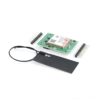
- 1 × FS-HCore-A7670C Development Board (Unsoldered Version)
- 1 × 4G Cellular Antenna
- 1 × Pin Header Set
Important Product Disclaimer
Product information is provided for general reference and development purposes. Cellular network performance, supported bands, data rates, and service availability depend on the specific module version, firmware, network operator, SIM card, geographical region, antenna, signal conditions, and network infrastructure.
The stated 10Mbps downlink and 5Mbps uplink figures represent maximum theoretical speeds and should not be considered guaranteed real-world performance.
A compatible and activated SIM card is required for cellular network operation and is not included unless specifically mentioned in the package contents.
Before deployment, verify that the SIM card, cellular operator, supported LTE/2G bands, and network technology are compatible with the A7670C module and the intended region.
Product images are shown for illustrative purposes only. The actual product may vary slightly in colour, dimensions, connector placement, PCB markings, antenna design, or appearance depending on the manufacturing batch.
Always read the product documentation, operating requirements, warnings, and specifications before powering or integrating the board into a project.
Manufacturer Reference
For additional information about the SIMCom A7670 series, users can refer to the manufacturer’s product documentation and specifications.
SIMCom A7670X Series – Manufacturer Website
Recommended Related Products
Explore relevant cellular communication products and categories available from Robosap.
4G/5G Modems – Robosap Product Category
Related Products and Categories
Explore relevant products and category pages available from Robosap.
Frequently Asked Questions (FAQs)
1. What is the FS-HCore-A7670C Development Board?
The FS-HCore-A7670C is a development board built around the SIMCom A7670C 4G LTE Cat.1 module. It provides UART, SIM card, antenna, power, and other interfaces for developing cellular IoT and embedded applications.2. What cellular networks does the board support?
The board supports 4G LTE Cat.1 connectivity and also provides 2G GSM/GPRS support where compatible networks are available.3. What is the maximum data speed of the A7670C?
The stated maximum theoretical speed is approximately 10Mbps download and 5Mbps upload. Actual speeds depend on the cellular network, signal strength, carrier, antenna, and other operating conditions.4. How does the board communicate with a microcontroller?
The FS-HCore-A7670C uses a UART TX/RX interface to communicate with a host microcontroller or embedded computer. The A7670C can be controlled using AT commands.5. Can I use this board with Arduino?
Yes. The board can be connected to a compatible Arduino through its UART interface and controlled using appropriate AT commands.6. Is the board compatible with ESP32?
Yes. The FS-HCore-A7670C can be connected to an ESP32 using a suitable UART interface and appropriate software.7. Can I use it with STM32?
Yes. The board is suitable for STM32-based projects that provide a compatible UART interface and appropriate voltage levels.8. Can this board be used with Raspberry Pi?
Yes. It can be used with a Raspberry Pi or other embedded computer that provides a compatible UART interface, subject to the appropriate electrical and software configuration.9. Does the board require a SIM card?
Yes. A compatible activated SIM card is required to access a cellular network. The SIM card is not included unless specifically mentioned in the package contents.10. Does the board include an antenna?
Yes. The package includes 1 × 4G cellular antenna.11. What type of antenna connector does the board use?
The board uses a U.FL (IPEX) connector for connecting a compatible external cellular antenna.12. What is the purpose of the UART interface?
The UART interface allows a host controller to communicate with the A7670C modem and send AT commands for configuration, network status, data communication, and other supported functions.13. What is the AT+CSQ command used for?
The AT+CSQ command can be used to check the reported cellular signal strength of the modem.
14. Why is the module not responding to AT commands?
Check that the board is powered correctly, TX and RX are connected correctly, the UART baud rate is appropriate, and the host controller shares a common ground with the modem.15. Why is the module repeatedly resetting?
Repeated resets can be caused by an unstable or insufficient power supply, particularly during cellular transmission when current demand can increase.16. Why is the board not registering on the network?
Check the SIM card, antenna connection, cellular coverage, signal strength, supported network bands, and whether the local carrier still provides the required 4G or 2G service.17. Can the board automatically switch between 4G and 2G?
The A7670C supports both 4G LTE Cat.1 and 2G GSM/GPRS, but actual network selection and fallback behaviour depend on module configuration, firmware, carrier support, and available networks.18. What type of applications can be built with this board?
It can be used for IoT devices, remote data loggers, GPS trackers, smart home gateways, telemetry systems, industrial monitoring, remote sensors, asset tracking, and cellular-enabled embedded systems.19. Can this board be used for GPS tracking?
It can be used as part of a cellular tracking system, provided the complete hardware configuration includes the required positioning capability and appropriate software. The cellular module's communication functions and positioning functionality should be verified for the specific module version.20. Does the board support AT commands?
Yes. The A7670C is controlled through AT commands sent over its UART interface.21. Is a USB cable included?
No USB cable is listed in the package contents. The package includes the development board, 4G cellular antenna, and pin header set.22. Are the pin headers already soldered?
The listed package contains the unsoldered version of the FS-HCore-A7670C development board along with a pin header set.23. What is included in the package?
The package includes:- 1 × FS-HCore-A7670C Development Board (Unsoldered Version)
- 1 × 4G Cellular Antenna
- 1 × Pin Header Set
24. Does the board include a SIM card?
No. A SIM card is not included and must be purchased separately.25. Is the 4G speed guaranteed?
No. The 10Mbps download and 5Mbps upload figures are maximum theoretical values. Actual performance depends on network conditions, carrier configuration, signal strength, antenna performance, and other factors.26. Can the board be used anywhere?
Not necessarily. Cellular compatibility depends on the A7670C module variant, supported frequency bands, local network technology, and mobile operator availability. Check regional compatibility before deployment.27. What should I check before using the board?
Before powering the board, verify the required supply voltage, SIM card installation, antenna connection, UART wiring, host-controller interface, and local cellular network compatibility.28. Is an external antenna necessary?
A suitable cellular antenna should be connected to the board's antenna connector for reliable cellular operation. The supplied antenna can be used where appropriate.29. Does the board have status LEDs?
Yes. The board includes power and network status indicators to provide visual feedback during operation.30. Is this board suitable for IoT projects?
Yes. Its 4G LTE Cat.1 connectivity, UART interface, SIM card support, and external antenna connection make it suitable for a wide range of cellular IoT and remote communication projects.Downloads and Resources
Only logged in customers who have purchased this product may leave a review.




Reviews
There are no reviews yet