
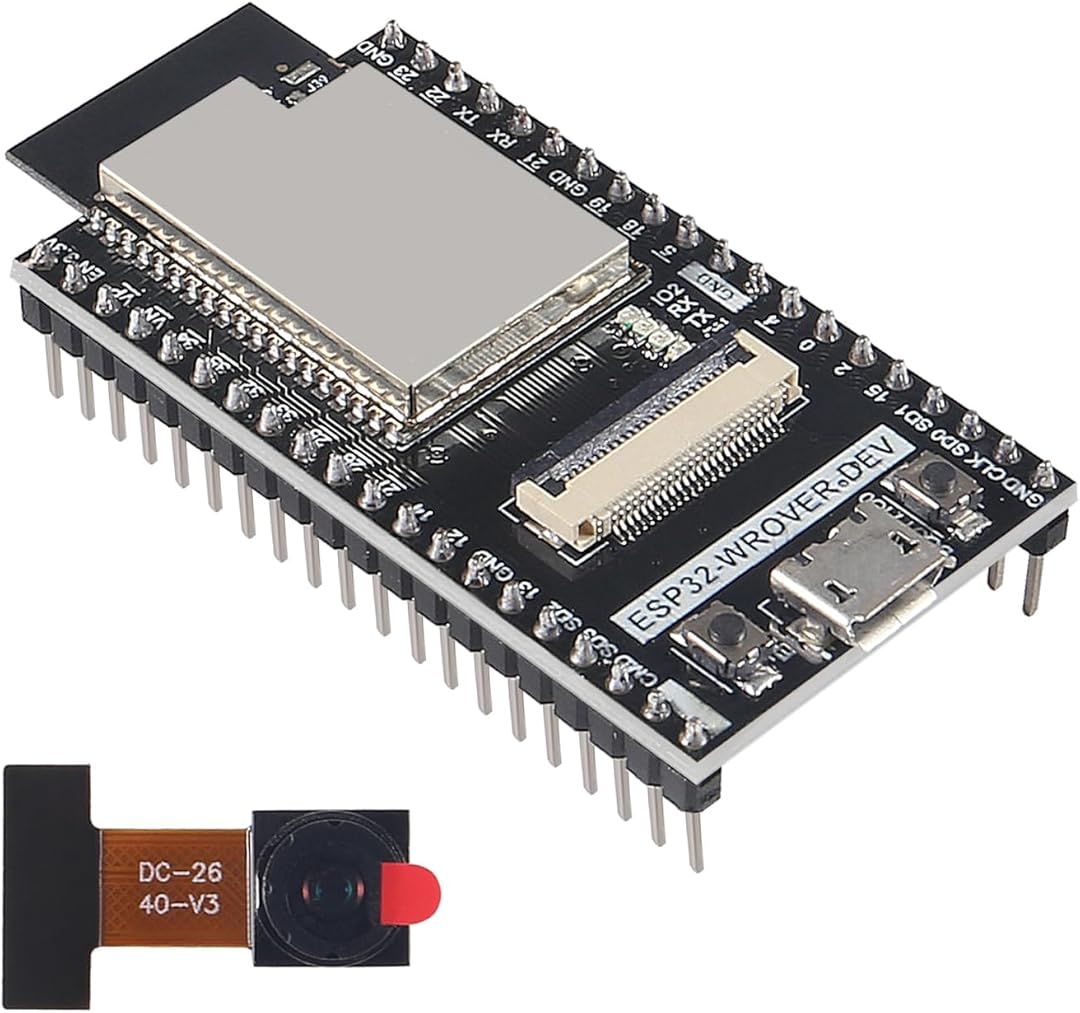
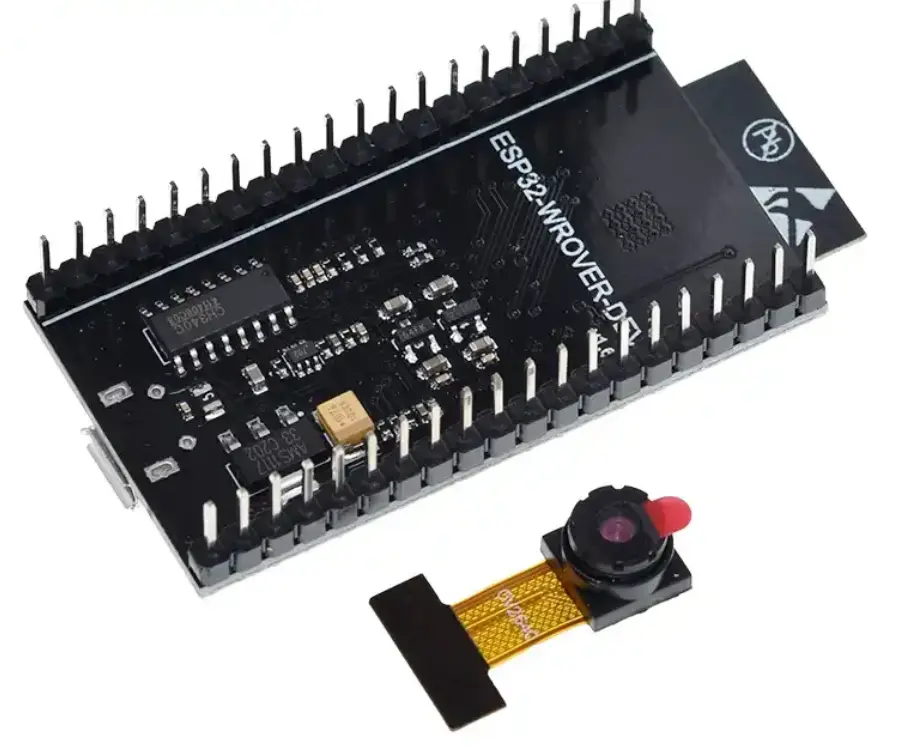
ESP32-WROVER CAM Board with OV2640 Camera
₹767.00 incl. GST (₹650.00 + GST)
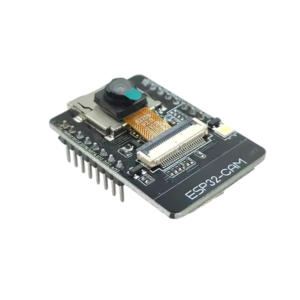
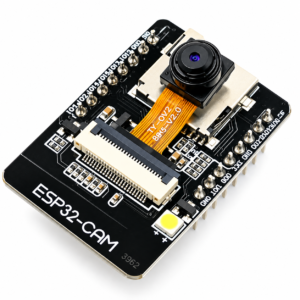
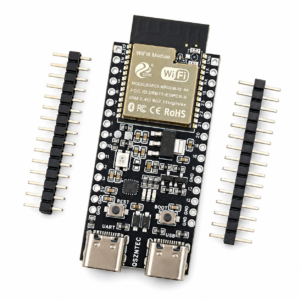
ESP32-WROVER CAM Board with OV2640 Camera is a compact Wi-Fi and Bluetooth camera development board for IoT camera projects, wireless video streaming, robotic vision, remote monitoring, image capture, automation, and embedded vision learning. It is suitable for Arduino IDE, ESP-IDF, C, and C++ based ESP32 camera development.
ESP32-WROVER CAM Board with OV2640 Camera
ESP32-WROVER CAM Board with OV2640 Camera is a compact Wi-Fi and Bluetooth camera development board for IoT camera projects, wireless video streaming, robotic vision, remote monitoring, image capture, smart home monitoring, and embedded vision learning. It is based on the Espressif ESP32 platform and includes an OV2640 camera module, therefore it is useful for projects where image capture or live camera output is required in a small form factor.
This board is suitable for students, makers, hobbyists, developers, and embedded system engineers who want to build ESP32 camera-based projects using Arduino IDE, ESP-IDF, C, or C++. It can be used for local Wi-Fi camera streaming, image capture, IoT camera monitoring, robotic camera systems, automation projects, and remote observation prototypes.
Why Use ESP32-WROVER CAM Board?
The ESP32-WROVER CAM Board combines camera support, wireless connectivity, and ESP32 processing in one compact development board. Since it supports Wi-Fi, users can create a camera web server and view the camera output over a local network. Bluetooth support can also be used for selected short-range communication, setup, or control applications depending on the firmware.
The onboard OV2640 camera is suitable for basic image capture, video streaming experiments, remote monitoring, robotic vision prototypes, and object observation projects. For heavy AI image processing, a more powerful edge AI board or external server may be required.
ESP32-WROVER CAM Board Features
ESP32-based Wi-Fi and Bluetooth camera development board
Built-in OV2640 camera module for image capture and video streaming
Suitable for IoT camera projects and wireless monitoring applications
Can be used for local Wi-Fi camera streaming using suitable firmware
Useful for robotic vision, smart home monitoring, and automation projects
Processor speed up to 240 MHz, depending on ESP32 configuration
Supports Arduino IDE, ESP-IDF, C, and C++ development
Compact board size for space-limited embedded camera projects
Suitable for educational, DIY, prototype, and development use
Can be integrated with web servers, IoT platforms, MQTT systems, or custom applications using suitable firmware
ESP32-WROVER CAM Board Compatibility
The ESP32-WROVER CAM Board with OV2640 Camera is compatible with common ESP32 development environments and project workflows. It can be programmed using Arduino IDE and ESP-IDF. Advanced users can develop custom firmware using C or C++.
Arduino IDE: Supported with ESP32 board package and compatible ESP32 camera examples
ESP-IDF: Supported for advanced ESP32 firmware development
C / C++: Supported
MicroPython: Limited or firmware-dependent camera support
Wi-Fi Camera Streaming: Supported using suitable ESP32 camera web server firmware
IoT Integration: Possible using HTTP, MQTT, web API, or custom firmware
Robotics Projects: Suitable for basic robotic vision and remote camera viewing
Typical Applications of ESP32-WROVER CAM Board
IoT camera projects
Wireless video streaming
ESP32 camera web server projects
Robotic vision systems
Remote monitoring devices
Smart home camera projects
Security and surveillance prototypes
Image capture projects
Automation systems with camera feedback
Sensor-based camera trigger projects
Embedded vision learning
Camera-based attendance prototypes
Object monitoring experiments
Educational ESP32 camera projects
How ESP32-WROVER CAM Board Can Be Used
Users can start by installing the ESP32 board package in Arduino IDE and uploading an ESP32 camera web server example. After entering the Wi-Fi SSID and password in the code, the board can stream camera output over a local network. The camera feed can be viewed in a browser using the IP address shown in the serial monitor.
For advanced projects, the ESP32-WROVER CAM Board can be connected to a local server, cloud server, IoT dashboard, MQTT platform, or custom application. It can also be used in robotics projects where remote camera viewing or basic image capture is required.
Important Usage Notes
Use a stable 5V power supply for reliable camera streaming.
Use a good-quality USB cable or programming connection.
Camera pin configuration may vary depending on the exact board version.
Available GPIO pins may be limited because many pins are used by the camera interface.
Do not connect motors, relays, or high-current loads directly to ESP32 GPIO pins.
For heavy AI vision processing, use an external server or dedicated edge AI board.
Package Includes
1 × ESP32-WROVER CAM Board with OV2640 Camera
Product Disclaimer
Product specifications, flash memory, PSRAM, PCB color, camera connector, antenna type, pinout, board layout, dimensions, markings, and minor hardware details may vary depending on stock availability, supplier batch, or manufacturer updates. Please verify the actual board, pinout, and technical details before using this product in final projects.
Images are for representation only. The actual product may differ slightly in appearance, color, size, shape, markings, layout, packaging, or accessories.
Recommended Related Products
Explore relevant alternatives and complementary products selected from the full Robosap catalogue.
- ESP32-CAM Camera Development Board OV2640 /OV3660 Camera Module
- ESP32-CAM WiFi Bluetooth Development Board with OV5640 5MP Camera Module
- ESP32 S3-Cam AI Vision Module
- ESP32-CAM-MB Download Bottom Board for ESP32-CAM OV2640 Camera Module
- OV3660 Camera Module for ESP32 CAM ESP32 S3 Development Board with SCCB Connector
- OV2640 2MP Camera Module with SCCB Connector
Technical Specifications
| Parameter | Details |
|---|---|
| Product Name | ESP32-WROVER CAM Board with OV2640 Camera |
| Processor Brand | Espressif |
| Microcontroller Platform | ESP32 |
| Processor Speed | Up to 240 MHz |
| Camera Module | OV2640 |
| Camera Use | Image capture and basic video streaming |
| Wireless Connectivity | Wi-Fi and Bluetooth |
| Flash Storage | 4MB as per provided board specification |
| RAM / PSRAM | 8MB memory support as per board configuration |
| Input Voltage | 5V |
| Programming Support | Arduino IDE, ESP-IDF, C, C++ |
| Common Interfaces | GPIO, UART, SPI, I2C, PWM, camera interface |
| Approx. Dimensions | 40 × 27 × 4 mm, approximate |
| Approx. Weight | 10 g, approximate |
| Application Type | IoT camera, video streaming, remote monitoring, robotic vision |
Important Specification Note
Flash memory, PSRAM, board dimensions, antenna design, connector position, pinout, regulator, USB/serial interface, and board markings may vary depending on the exact board version or supplier batch. Please verify the actual board and pinout before using it in final projects.
The ESP32-WROVER CAM Board provides camera interface support and selected GPIO pins for embedded camera applications. Since ESP32 camera boards use several internal pins for the camera module, the number of free GPIO pins may be limited.
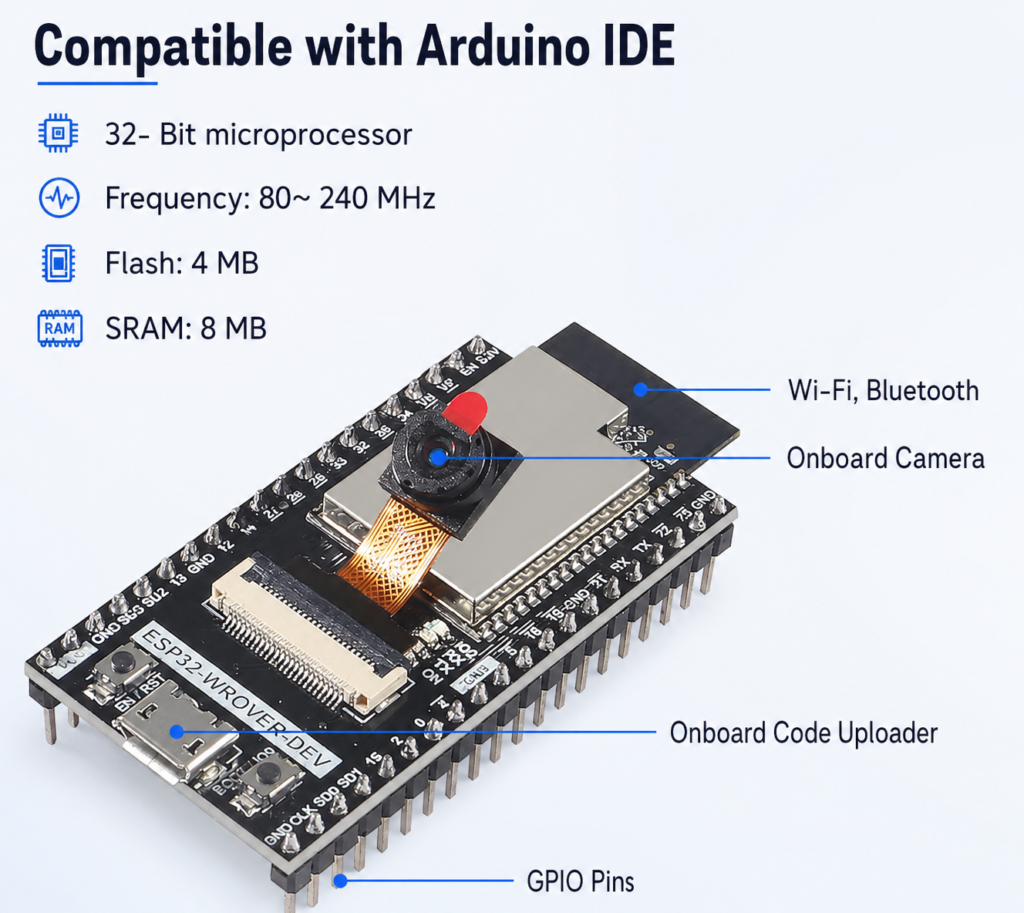
Pinout wiriing for esp32 wrover cam
| Interface / Section | Purpose |
| Camera Interface | Connects the OV2640 camera module to the ESP32 |
| Wi-Fi | Used for image transfer, web camera server, and IoT connectivity |
| Bluetooth | Used for short-range communication or setup applications |
| UART | Used for serial communication, debugging, or programming depending on board design |
| GPIO | Used for selected digital input and output functions |
| SPI | Can be used for compatible external devices if pins are available |
| I2C | Can be used for sensors or modules if free GPIO pins are available |
| 5V Input | Used to power the board |
| GND | Common ground connection |
Power Supply Note
ESP32 camera boards require a stable 5V power supply. Camera streaming and Wi-Fi transmission can draw higher current than simple ESP32 projects. If the board restarts, disconnects, or camera streaming fails, use a good-quality USB cable and a stable 5V power source.
Wiring Safety Note
Do not connect high voltage, motors, relays, or heavy loads directly to the ESP32 GPIO pins. Use proper driver circuits, relay modules, motor drivers, optocouplers, and external power supplies wherever required.Q1. What is the ESP32-WROVER CAM Board used for?
The ESP32-WROVER CAM Board is used for IoT camera projects, wireless video streaming, robotic vision, remote monitoring, smart home camera systems, image capture, and embedded vision learning.
Q2. Which camera is used on this board?
This board comes with an OV2640 camera module, which is commonly used in ESP32 camera projects for image capture and basic video streaming applications.
Q3. Does this board support Wi-Fi?
Yes, this board supports Wi-Fi. It can be used for wireless image transfer, local network camera streaming, IoT camera projects, and web server based camera applications.
Q4. Does this board support Bluetooth?
Yes, the ESP32 supports Bluetooth. Bluetooth can be used for short-range communication, device setup, and selected embedded control applications depending on the firmware.
Q5. Can I use this board with Arduino IDE?
Yes, the board can be programmed using Arduino IDE after installing the ESP32 board package. You may need to select a compatible ESP32 camera board profile and use the correct camera pin configuration.
Q6. Can I use this board with ESP-IDF?
Yes, ESP-IDF can be used for advanced development. ESP-IDF is suitable for users who want better control over Wi-Fi, camera handling, memory management, and custom firmware.
Q7. Can I use MicroPython on this board?
MicroPython support depends on the firmware and camera library availability. For camera-based projects, Arduino IDE or ESP-IDF is usually more commonly used.
Q8. Can I stream live video from this board?
Yes, this board can be used for basic live video streaming over Wi-Fi using suitable ESP32 camera web server firmware. Streaming performance depends on resolution, Wi-Fi signal quality, power supply, and firmware settings.
Q9. Is this board suitable for robotic vision?
Yes, it can be used for basic robotic vision, remote viewing, object monitoring, and image capture projects. For heavy AI vision processing, an external server, cloud system, or more powerful edge AI board may be required.
Q10. Can this board do face recognition?
ESP32 camera examples can support basic face detection or face recognition experiments depending on firmware and memory availability. However, performance is limited compared to dedicated AI vision boards.
Q11. Does this board have built-in storage?
The board has onboard flash memory as per board configuration. Some ESP32 camera boards may also support external storage such as a microSD card slot, but this depends on the exact board version. Please check the actual board before use.
Q12. What power supply is required?
The board typically uses 5V input. A stable power supply is important because camera streaming and Wi-Fi transmission can draw higher current than simple ESP32 projects.
Q13. Why does the ESP32 camera board restart during streaming?
Restarting is usually caused by weak power supply, poor USB cable, unstable 5V input, incorrect firmware settings, or insufficient current. Use a reliable 5V supply and a proper USB data cable.
Q14. Can I connect sensors to this board?
Yes, selected sensors can be connected using available GPIO, I2C, UART, or SPI pins. However, camera boards use several ESP32 pins internally for the camera, so available GPIO pins may be limited.
Q15. Can I use this board for security camera projects?
Yes, it can be used for security camera prototypes, remote monitoring, and local Wi-Fi camera experiments. For commercial or critical security use, proper enclosure, power backup, network security, and reliability testing are required.
Q16. Can I upload images to a server?
Yes, images can be sent to a local server, cloud server, web API, or IoT platform using Wi-Fi and suitable firmware.
Q17. Is this board beginner friendly?
Yes, it is suitable for beginners who want to learn ESP32 camera projects. However, it may require correct board selection, camera pin configuration, and stable power supply, so users should carefully follow setup instructions.
Q18. What is included in the package?
The package includes 1 × ESP32-WROVER CAM Board with OV2640 Camera.
Only logged in customers who have purchased this product may leave a review.



Reviews
There are no reviews yet