
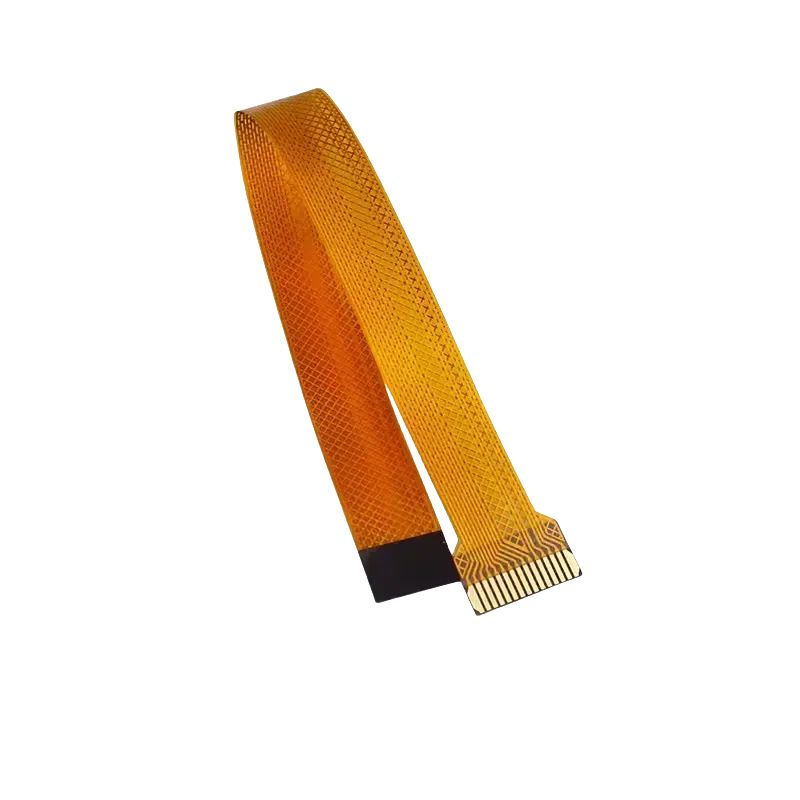
Raspberry Pi 5 Camera FPC Cable – 300mm Mini to Standard
₹212.40 incl. GST (₹180.00 + GST)
Raspberry Pi 5 Camera FPC Cable is a 300mm flexible adapter cable designed to connect the Raspberry Pi 5’s 22-way 0.5mm MIPI port to standard 15-way 1mm camera or display connectors. Supporting 4-lane MIPI, it is ideal for Raspberry Pi 5 cameras, displays, robotics, custom enclosures, and embedded projects.
Raspberry Pi 5 Camera FPC Cable – 300mm 22-Pin to 15-Pin MIPI Camera/Display Adapter
Product Description
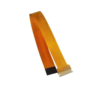
The Raspberry Pi 5 Camera FPC Cable is a flexible adapter cable designed to connect Raspberry Pi 5’s new 22-way, 0.5mm-pitch MIPI connectors to compatible cameras and displays using the standard 15-way, 1mm-pitch connector.
With a length of approximately 300mm, this FPC cable provides additional flexibility for camera mounting, robotics, custom enclosures, display installations, and other projects where the peripheral needs to be positioned away from the Raspberry Pi 5 board.
The cable supports the Raspberry Pi 5’s high-speed 4-lane MIPI interface, making it suitable for compatible camera and display applications. Its flexible construction allows easier cable routing through compact enclosures while maintaining a reliable connection between the Raspberry Pi 5 and supported peripherals.
Features
- Designed for Raspberry Pi 5
- Converts 22-way mini MIPI connector to 15-way standard connector
- 300mm cable length
- 0.5mm pitch Raspberry Pi 5 connector
- 1.0mm pitch standard connector
- Supports 4-lane MIPI communication
- Flexible FPC construction
- Suitable for Raspberry Pi cameras and displays
- Ideal for robotics and custom enclosures
- Allows flexible placement of cameras and displays
- Suitable for long-reach cable routing
Specifications
| Parameter | Specification |
|---|---|
| Product Type | Raspberry Pi 5 Camera/Display FPC Cable |
| Length | 300mm |
| Connector A | 22-Way, 0.5mm Pitch |
| Connector B | 15-Way, 1.0mm Pitch |
| Compatibility | Raspberry Pi 5 Camera/Display Ports |
| Cable Type | Flexible Printed Circuit (FPC) |
| MIPI Support | 4-Lane |
Working Principle
The cable acts as an interface adapter between the Raspberry Pi 5’s compact 22-way MIPI connector and compatible peripherals using the standard 15-way connector.
It carries high-speed MIPI camera or display signals between the Raspberry Pi 5 and the connected peripheral while maintaining the required connector format and pin arrangement.
Flexible Design
The 300mm length provides additional flexibility when mounting cameras or displays away from the Raspberry Pi 5.
This makes the cable useful for:
- Robotic camera mounts
- Custom enclosures
- Wall-mounted cameras
- Remote display mounting
- Compact embedded systems
- Camera positioning projects
Typical Application Scenarios
Robotics
Useful for mounting cameras on robotic arms, elevated platforms, mobile robots, and other moving systems.
Custom Enclosures
Allows cameras or displays to be positioned away from the Raspberry Pi 5 while keeping the main board inside a custom enclosure.
Dual Camera or Display Projects
Suitable for connecting compatible standard-format cameras or displays to the Raspberry Pi 5’s MIPI ports.
Time-Lapse and Camera Projects
The additional cable length provides flexibility for positioning cameras at different angles and mounting locations.
Applications
- Raspberry Pi 5 camera projects
- Raspberry Pi 5 display projects
- Robotics
- Computer vision
- Camera surveillance
- Time-lapse systems
- Custom enclosures
- IoT camera systems
- Embedded displays
- Raspberry Pi prototyping
- Mobile robot cameras
- Camera monitoring systems
Package Includes
- 1 × 300mm FPC Camera/Display Cable for Raspberry Pi 5
Important Product Disclaimer
Please note that the product information provided on our website may not be entirely accurate as it is collected from various sources on the web. While we strive to provide the latest information possible, we cannot guarantee that all specifications are completely accurate. We recommend checking the connector type, pin configuration, and compatibility before installation.
Product images are shown for illustrative purposes only and may differ slightly from the actual product.
Important Notes
Connector Installation
Make sure the 22-way, 0.5mm-pitch end is correctly aligned with the Raspberry Pi 5 MIPI connector before locking the connector tab.
Handle Carefully
The 0.5mm-pitch connector is very fine. Do not force the cable into the connector, as incorrect alignment or excessive pressure may damage the connector contacts.
Power Off Before Installation
Always power off the Raspberry Pi 5 before connecting or disconnecting MIPI camera or display cables.
Cable Routing
Avoid sharply folding or twisting the FPC cable excessively. Route it carefully to prevent damage to the flexible conductors.
Recommended Related Products
Explore relevant alternatives and complementary products selected from the full Robosap catalogue.
Frequently Asked Questions
1. What is this cable used for?
It is used to connect compatible standard-format cameras or displays to the Raspberry Pi 5 MIPI ports.
2. What is the cable length?
The cable is approximately 300mm long.
3. What connectors does it have?
It has a 22-way 0.5mm-pitch connector on one end and a 15-way 1mm-pitch connector on the other.
4. Is it compatible with Raspberry Pi 5?
Yes. It is designed specifically for the Raspberry Pi 5's new MIPI camera/display connectors.
5. Can it be used for cameras?
Yes. It can be used with compatible Raspberry Pi cameras using the standard 15-way connector.
6. Can it be used for displays?
Yes. The Raspberry Pi 5 MIPI connectors can support compatible camera or display peripherals.
7. Does it support 4-lane MIPI?
Yes. The cable supports 4-lane MIPI connections.
8. Can I use it in robotics?
Yes. The 300mm length is useful for mounting cameras away from the Raspberry Pi 5 in robotic systems.
9. Is the Raspberry Pi 5 included?
No. The package includes only the 300mm FPC cable.
10. Is the camera or display included?
No. Cameras, displays, and other peripherals are sold separately.
11. Can the cable be folded?
The cable is flexible, but excessive bending, sharp folds, or twisting should be avoided to prevent damage.
12. Should the Raspberry Pi 5 be powered off when connecting the cable?
Yes. Power off the Raspberry Pi 5 before connecting or disconnecting the MIPI cable.
Only logged in customers who have purchased this product may leave a review.



Reviews
There are no reviews yet