
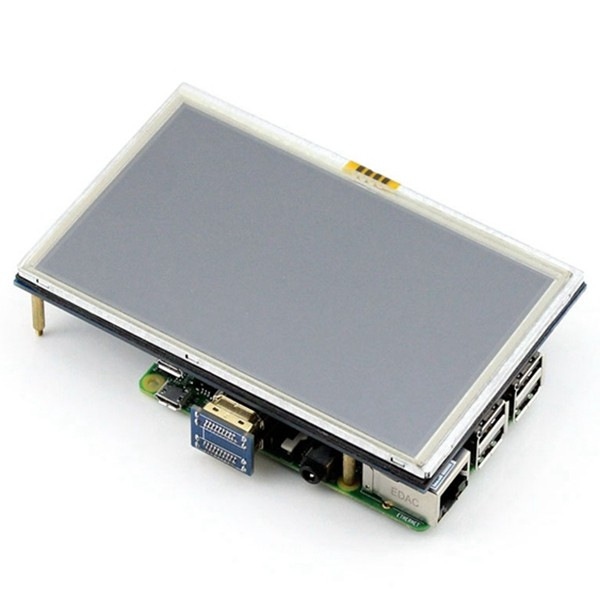
5 inch Touch Display for Raspberry Pi With HDMI
₹3,292.20 incl. GST (₹2,790.00 + GST)
The 5-Inch HDMI Touch Display for Raspberry Pi is a compact display designed for Raspberry Pi and compatible embedded computing projects. It features an 800 × 480 pixel resolution, resistive touchscreen, and backlight control switch for convenient display operation. Powered by 5V DC with a specified current requirement of 2A, it is suitable for interactive interfaces, IoT dashboards, home automation, robotics, and DIY electronics projects. It supports compatible Raspberry Pi configurations
Product Description
The 5-Inch HDMI Touch Display for Raspberry Pi is a compact display solution designed for Raspberry Pi projects, embedded computing, and DIY electronics applications. Featuring an 800 × 480 pixel resolution, a resistive touchscreen, and a backlight control switch, it provides a convenient interface for displaying information and interacting with compatible software.
The display supports HDMI video input for compatible host devices, while its resistive touch functionality enables touch-based interaction when the appropriate touch interface, drivers, and software are supported. It operates at DC 5V with a specified current requirement of 2A, making it suitable for compact embedded systems and portable project setups.
Designed primarily for the Raspberry Pi series, this display can also be used with compatible platforms such as Banana Pi, pcDuino, and Cubieboard, although the supplied specifications indicate that touch functionality is unavailable on these alternative platforms.
With support for suitable firmware and drivers, the 5-inch HDMI touch display is ideal for building interactive control panels, IoT dashboards, smart home interfaces, robotics systems, and embedded monitoring devices.
2. Features
-
5-inch compact display suitable for embedded and portable projects.
-
800 × 480 pixel resolution for displaying text, images, and graphical interfaces.
-
HDMI video input for compatible host devices.
-
Resistive touchscreen for touch-based interaction on supported configurations.
-
Backlight control switch for convenient display operation.
-
5V DC operating voltage.
-
Specified current requirement of 2A.
-
Designed primarily for Raspberry Pi series boards.
-
Supports compatible alternative platforms, subject to interface and driver requirements.
-
Firmware and drivers available for supported configurations.
-
Suitable for DIY electronics, IoT, robotics, and embedded applications.
3. Specifications
| Specification | Details |
|---|---|
| Product Name | 5-Inch HDMI Touch Display for Raspberry Pi |
| Display Size | 5 inches |
| Resolution | 800 × 480 pixels |
| Video Interface | HDMI |
| Touch Technology | Resistive |
| Backlight Control | Backlight control switch |
| Operating Voltage | DC 5V |
| Specified Current Requirement | 2A |
| Primary Compatibility | Raspberry Pi series |
| Other Supported Platforms | Banana Pi, pcDuino, Cubieboard, subject to compatibility |
| Touch Functionality on Alternative Platforms | Unavailable according to supplied information |
| Software Support | Firmware and drivers for supported configurations |
| Applications | Embedded displays, control panels, IoT dashboards, robotics |
Note: The exact touch-controller interface, physical dimensions, brightness, viewing angle, and compatibility with individual Raspberry Pi models were not specified in the supplied information. These details should be confirmed for the exact product revision.
4. Working Principle
The display receives video signals from a compatible host device through its HDMI interface and presents the output at its native resolution of 800 × 480 pixels.
The resistive touchscreen detects physical pressure on the display surface. When touch support is correctly configured, the touch controller communicates the touch position to the host system, allowing the user to interact with compatible applications.
The display’s backlight illuminates the screen, and the backlight control switch provides a means of controlling illumination. The display operates from a 5V DC power source, with a specified current requirement of 2A.
5. HDMI Interface
The HDMI interface allows the display to receive video output from compatible host devices.
It can be used for:
-
Displaying a Raspberry Pi desktop
-
Running graphical applications
-
Showing monitoring dashboards
-
Displaying menus and control interfaces
-
Viewing system information
-
Building compact embedded terminals
The host device must support a compatible video output configuration. HDMI carries video and audio signals, but touch input generally requires a separate compatible touch-data connection.
6. Resistive Touchscreen
The display uses resistive touchscreen technology, which detects input when pressure is applied to the screen.
On supported configurations, touch input can be used to:
-
Select menu items
-
Operate graphical buttons
-
Navigate compatible applications
-
Control embedded interfaces
-
Interact with monitoring dashboards
Touch functionality depends on the particular touch-controller interface, compatible drivers, and operating system configuration. Confirm the required touch connection before installation.
7. Power Supply and Backlight Control
The display has a specified operating voltage of 5V DC and a current requirement of 2A.
Use a suitable regulated power supply that can provide the required current. If the host device and display share a power source, ensure the supply can handle their combined requirements.
The built-in backlight control switch allows the display’s illumination to be controlled according to the design of the particular version.
8. Compatibility and Software Support
The display is primarily designed for Raspberry Pi projects. It may also work with compatible Banana Pi, pcDuino, or Cubieboard systems, depending on the video interface and available drivers.
Official firmware and drivers are available for supported configurations. An integrated firmware option containing the required driver may simplify setup.
Before use, verify:
-
HDMI output compatibility
-
Touch-controller interface
-
Required driver availability
-
Operating system compatibility
-
Power requirements
-
Physical mounting requirements
9. Applications
The 5-inch HDMI touch display is suitable for:
-
Raspberry Pi projects
-
Smart home control panels
-
IoT monitoring dashboards
-
Robotics control interfaces
-
Embedded computing systems
-
DIY touchscreen terminals
-
Portable information displays
-
Home automation systems
-
Sensor monitoring projects
-
Industrial monitoring prototypes
-
Educational electronics projects
-
Interactive user interfaces
-
Compact kiosk and terminal projects
10. Package Includes
The supplied product information does not explicitly confirm all package contents. Please verify whether the package includes the display only or also includes HDMI cables, USB cables, adapters, and mounting accessories.
11. Product Disclaimer
-
This display is intended for compatible Raspberry Pi and embedded computing projects.
-
Touch functionality requires a compatible touch interface, drivers, and software.
-
HDMI provides video input; it does not necessarily provide touch communication.
-
The exact touch-controller interface and supported operating systems should be confirmed for the particular product version.
-
Use a suitable regulated 5V DC power supply capable of meeting the specified 2A current requirement.
-
Compatibility with individual Raspberry Pi models and alternative development boards may vary.
-
Accessories shown in product images may not be included unless specifically listed.
Note: The product images are for illustration and representation purposes only. The actual product may slightly differ in appearance, colour, design, or component placement from the images shown due to manufacturing variations and production batches.
Frequently Asked Questions (FAQs)
1. What is the 5-Inch HDMI Touch Display for Raspberry Pi?
It is a compact display with an 800 × 480 resolution, HDMI video input, and a resistive touchscreen for compatible Raspberry Pi and embedded computing projects.2. What is the screen size?
The display size is 5 inches.3. What is the screen resolution?
It has a resolution of 800 × 480 pixels.4. Does it support HDMI?
Yes. The display is specified with an HDMI video interface for compatible host devices.5. Is this display compatible with Raspberry Pi?
Yes. It is designed primarily for the Raspberry Pi series, subject to the compatibility of the particular model and software configuration.6. Does it have a touchscreen?
Yes. It uses a resistive touchscreen.7. What is a resistive touchscreen?
A resistive touchscreen detects pressure applied to its surface. It can respond to a finger, stylus, or another suitable object that applies pressure.8. Does HDMI provide both video and touch functionality?
HDMI provides video input, but touch communication generally requires a separate compatible connection and suitable drivers.9. What is the operating voltage?
The specified operating voltage is 5V DC.10. What is the current requirement?
The supplied specifications state a current requirement of 2A.11. Does the display have a backlight?
Yes. It includes a backlight and a backlight control switch.12. Can I control the backlight?
The product includes a backlight control switch. The exact control method depends on the design of the supplied version.13. Can it be used with Banana Pi?
Banana Pi is listed as a supported alternative platform, but the supplied information states that touch functionality is unavailable on alternative platforms.14. Can it be used with pcDuino?
pcDuino is listed as a supported alternative platform, with the same touch-functionality limitation stated in the supplied information.15. Can it be used with Cubieboard?
Cubieboard is listed as a supported alternative platform, but touch functionality is unavailable according to the supplied specifications.16. Are drivers available?
Yes. Firmware and drivers are available for supported configurations according to the supplied product information.17. Is integrated firmware available?
Yes. An integrated firmware option containing the driver is mentioned as a way to simplify setup.18. Can I use it for a Raspberry Pi desktop?
Yes, provided the Raspberry Pi model, operating system, HDMI output configuration, and display settings are compatible.19. Can it display text and graphics?
Yes. Its 800 × 480 resolution supports text, images, graphical interfaces, and application output.20. Can it be used for home automation?
Yes. It can serve as a compact visual interface for compatible home automation systems.21. Can it be used for IoT monitoring?
Yes. It can display sensor readings, device status, dashboards, and other information generated by compatible IoT applications.22. Can it be used in robotics projects?
Yes. It can be used as a display for robotics control panels, system monitoring, and compatible touch-based interfaces.23. Can I connect it to a computer using HDMI?
It may work with a computer that provides a compatible HDMI output, but touch functionality requires a separate supported touch-data connection and appropriate drivers.24. Is it suitable for embedded systems?
Yes. Its compact size and HDMI input make it suitable for compatible embedded computing and monitoring applications.25. What power supply should I use?
Use a regulated 5V DC supply capable of providing the specified 2A current requirement, following the product's connection instructions.26. Can I power it directly from the Raspberry Pi?
Whether the Raspberry Pi can power the display depends on the particular Pi model, power supply, and the total current drawn by connected devices. A suitable separate supply may be required.27. Does the display support every Raspberry Pi model?
The product is described as suitable for the Raspberry Pi series, but compatibility should be confirmed for the specific model and its video output configuration.28. Does the package include HDMI and USB cables?
The supplied package information does not confirm whether these cables are included. Check the seller's package contents before purchasing.29. What are the physical dimensions?
The exact physical dimensions are not provided in the supplied specifications.30. What is the display brightness?
The brightness value is not specified in the supplied product information.31. Can it be used for an industrial control panel?
It can be used for suitable monitoring and control prototypes. Confirm the environmental, electrical, and mechanical requirements before using it in an industrial installation.32. Is it suitable for beginners?
Yes. It can be used for learning Raspberry Pi display interfacing, embedded computing, and touchscreen application development.33. Can I use a stylus with the touchscreen?
A suitable stylus may work because the screen responds to pressure. Compatibility depends on the touch-panel construction.34. Does the display include a Raspberry Pi board?
No Raspberry Pi board is listed in the supplied product description. Unless the seller specifies otherwise, do not assume the host board is included.35. What should I check before purchasing?
Verify the display interface, touch-data connection, supported Raspberry Pi model, driver availability, power requirements, and package contents.36. What are the main advantages of this display?
Its main advantages are 5-inch compact size, 800 × 480 resolution, HDMI video input, resistive touch capability, and a backlight control switch, making it useful for compatible embedded and Raspberry Pi projects.Only logged in customers who have purchased this product may leave a review.



Reviews
There are no reviews yet