
Robosap.in issues GST invoices for eligible business purchases. If you are buying robotics, electronics, IoT, embedded systems, automation, or project components for your company, institution, lab, or business, you can add your GSTIN details during checkout.
This helps us generate a GST invoice with your business details, which may be used for claiming GST input tax credit as per applicable GST rules.
Where to Add GSTIN on Checkout Page
On the checkout page, you will find an optional checkbox as shown below:
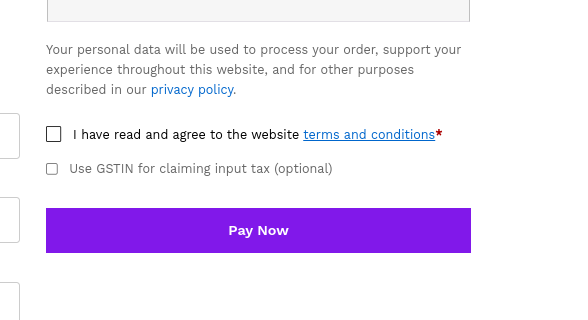
Use GSTIN for claiming input tax (optional)
This option is available just below:
I have read and agree to the website terms and conditions
If you want a GST invoice with your GSTIN, select this checkbox and enter the required business details.
Steps to Add GSTIN
- Add your products to cart and proceed to checkout.
- Fill in your billing and shipping details.
- Tick the checkbox “Use GSTIN for claiming input tax (optional)”.
- Enter your GSTIN and company details correctly.
- Review your order details.
- Click Pay Now to complete the order.
Details Required for GST Invoice
Please make sure the following details are entered correctly:
| Detail | Requirement |
|---|---|
| GSTIN | Enter valid GST number |
| Company Name | Enter business name as per GST registration |
Important Note
GSTIN entry is optional. Individual customers who do not require GST input credit can leave this option unchecked and continue with normal checkout.
For business purchases, please enter GSTIN details before completing the order. Once the invoice is generated, changes to GST details may not be possible. In case of any mistake, contact sales@robosap.in support as soon as possible after placing the order.
Is GSTIN Mandatory?
No. GSTIN is optional.
You need to enter GSTIN only if you are buying for business use and want GST details on your invoice. If you are purchasing as an individual customer, you can leave this option unchecked and continue with normal checkout.
Need Help?
If you are unable to find the GSTIN option during checkout or need help with GST invoice details, contact sales@robosap.in or +919353891359 for support ..

